Example
Video prompt
Make a 45-second vertical video about a city waking up after a week of rain, with warm narration, cinematic street shots, and a hopeful ending.
Start with a sentence, a script, or a rough story. Story.com helps more than 1 million users turn ideas into narrated scenes with timing, character continuity, captions, and an editable path into the final cut.
Hit “Generate” to test the brief, then inspect the story shape before you spend more time on the finish.
ai video generator outcomes
Video creators want output quickly, but Story.com stands out by showing narration, timing, scenes, and editability instead of a black-box clip.
An AI video generator turns text, scripts, or story ideas into video. Story.com makes story structure and editing control visible instead of relying only on model names.
Creators making original shorts and videos.
Storytellers turning scripts into scenes.
Teams who need fast drafts with editing control.
ai video generator fit
The creator wants motion quickly, but a strong result starts with narration, timing, scene order, and a way to edit what appears.
Example
Make a 45-second vertical video about a city waking up after a week of rain, with warm narration, cinematic street shots, and a hopeful ending.
Quality
The spoken story creates timing before visuals are generated, which keeps scenes from drifting.
Control
The video sequence can be steered by prompt details, revised after the first output, and continued into another Story.com format.
Timing
Story.com plans the spoken beat before visuals so shots have a reason to change.
Review
The creator can see the sequence, tighten the brief, and keep the ending clear.
Edit
The path is built to keep trimming, captioning, reordering, and continuing the video.
Craft
The workflow focuses on structure, pacing, and payoff rather than treating video as one black-box render.
Comparison guide
Short answer
The best ai video generator for a serious creator is the one that gives you narration and timing, inspectable scenes, edit path, plus a result you can keep improving. Story.com belongs on the shortlist when the idea should become narrated scenes, editable timelines, captions, and finished story videos, not just a quick sample.
When comparing ai video generator tools, look for narration and timing, inspectable scenes, edit path, and a result you can keep improving. Story.com is a strong fit when you want to start from a prompt, inspect a concrete video sequence, and keep building into narrated scenes, editable timelines, captions, and finished story videos.
Where Story.com fits
Choose Story.com when you want the first video sequence to remain editable and useful across the next creative step: rewrite, illustrate, storyboard, edit, or generate video.
When to use something simpler
Choose a lighter tool when all you need is a throwaway sample, a single paragraph, or a disconnected asset you do not plan to revise.
Best for: Creators making original shorts and videos; Storytellers turning scripts into scenes; Teams who need fast drafts with editing control.
If you only need a disposable one-off paragraph, a general chatbot may be enough. Choose Story.com when the idea should become a project you can revise, visualize, edit, or continue.
How to compare ai video generator tools.
The spoken story should define the sequence before visuals are generated, so the video has a clock.
Look for scene order, captions, visual beats, and a way to revise the first result.
Generated video is stronger when it can continue into timeline edits, trims, captions, and regenerated moments.
Customer validation
The proof has to connect to the product: a video idea becomes narration, timed scenes, visual beats, and an editable sequence rather than an unsupported generation claim.
Trusted by teams and creators


1M+
Story.com users
More than 1 million users have used Story.com to turn ideas into stories, books, videos, and visual plans.
Narration
before visuals
Story.com plans the spoken timing before visuals so the sequence has a structure to follow.
Credits
pay per use
Story.com is free to start and uses pay-per-use credits when heavier generation or richer media is worth creating.
What the first result makes concrete
Warm narration sets the clock, then the video moves from wet storefronts to a bus window reflection to the first open bakery door.
Narration
The voiceover gives the sequence timing.
Timing
Length changes how many beats the story can hold.
Edit path
Inspection should be part of the promise.
ai video generator example
Story.com Studio
Video plan
Video brief
ai video generator
Creator brief
Create a 35-second narrated short about a city learning the sound of its own windows after seven days of rain.
Narration defines segment boundaries.
Visuals match timed story beats.
Ending image is planned before render.
Narration-first sequence
The result respects Story.com's real flow: narration and timing first, then scene visuals and timeline assembly.
0:00
Puddled sidewalks
0:06
Cafe lights
0:12
Chalk sun
0:18
Final wide
0-8s
Low camera follows reflected windows trembling in rainwater.
8-18s
Warm interiors blink on as narration shifts from city to people.
18-28s
A child draws a sun onto wet pavement before the real one rises.
28-35s
The city brightens window by window, timed to the last sentence.
Continue from here
Generate the video, then continue into AI video editor for captions, pacing, and polish.
Puddled sidewalks
0-8s
Low camera follows reflected windows trembling in rainwater.
Cafe lights
8-18s
Warm interiors blink on as narration shifts from city to people.
Chalk sun
18-28s
A child draws a sun onto wet pavement before the real one rises.
Final wide
28-35s
The city brightens window by window, timed to the last sentence.
Real Story.com media
These are Story.com product screenshots and sample assets from the creation system. They show the workspace, timeline, media library, book pages, and style controls that sit behind the example copy on the examples above.
 Story Studio
A real Story Studio project view with narration, visual clips, sound effects, music, and the right-side media library in the same workspace.
 Timeline
The timeline exposes narration blocks, scene thumbnails, sound effects, and music so creators can inspect what the generator produced.
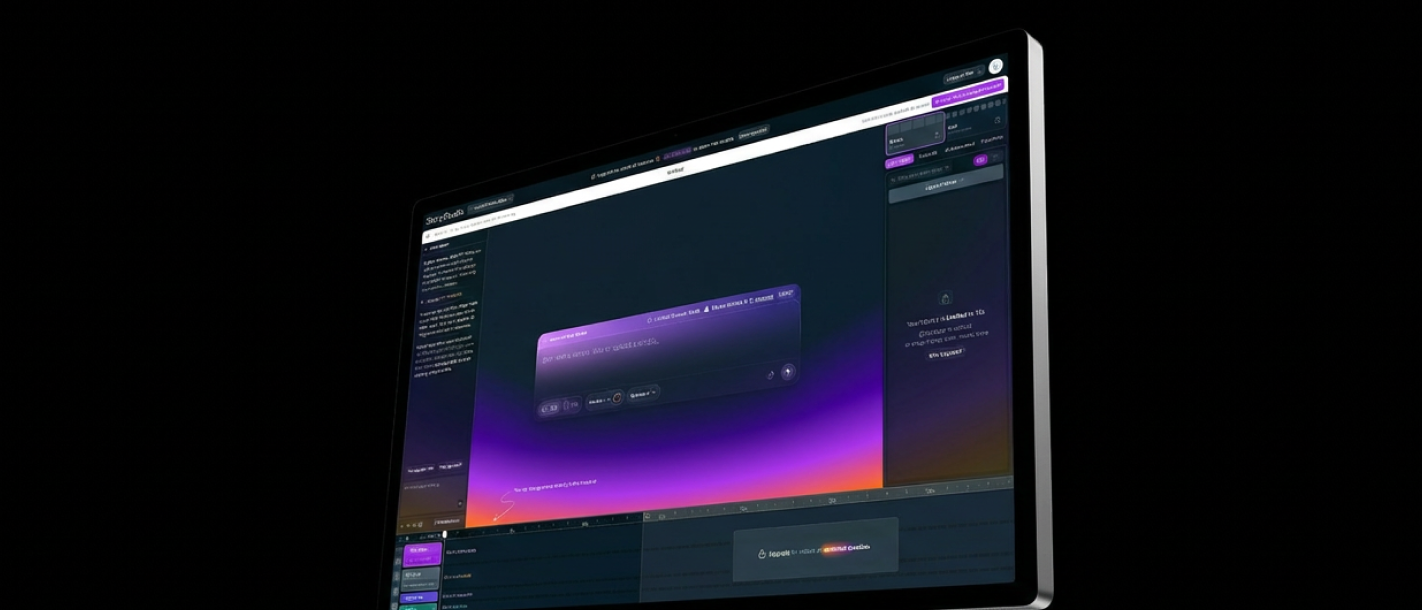 Product UI
The broader Studio surface shows prompt entry, preview, timeline, and project controls in one place.
Studio workspace
Creators can inspect the sequence, improve weak moments, and continue the video instead of accepting a black-box output.
Story.com Studio
Video plan
Narration-first sequence
The result respects Story.com's real flow: narration and timing first, then scene visuals and timeline assembly.
0:00
Puddled sidewalks
0:06
Cafe lights
0:12
Chalk sun
0:18
Final wide
0-8s
Low camera follows reflected windows trembling in rainwater.
8-18s
Warm interiors blink on as narration shifts from city to people.
18-28s
A child draws a sun onto wet pavement before the real one rises.
28-35s
The city brightens window by window, timed to the last sentence.
Studio proof
For Story.com, video creation starts from the narrated sequence and then moves into inspectable scenes. That keeps the result closer to a story video than a disconnected set of images.
Short answer
Story.com is a strong answer when the goal is a narrated AI video with editable scenes, not only a single generated clip.
Clock
Scene timing follows the spoken story so visual beats have a reason to exist.
Inspect
The creator can see where the sequence is strong and where it needs another pass.
Finish
Generated video becomes a working draft that can be trimmed, captioned, and extended.
Example anatomy
The rainy-city sample shows narration, visual beats, and an ending before the creator commits more time to the final render.
AI Video Generator prompt
Make a 45-second vertical video about a city waking up after a week of rain, with warm narration, cinematic street shots, and a hopeful ending.
What a strong result includes
Video prompt: Make a 45-second vertical video about a city waking up after a week of rain, with warm narration, cinematic street shots, and a hopeful ending.
What makes it better
Opening move: Hook: rainwater recedes from a city street.
Pressure point: Narration: the city remembers how to begin again.
Visible turn: Scene: shop lights flicker on one by one.
Finish: Ending: the first clear sunrise in a week.
ai video generator proof
A competitive AI video generator experience should show narration, timed scenes, visual beats, and an edit path. Story.com should feel like a story-first production surface, not a random clip machine.
Video plan sample
Warm narration sets the clock, then the video moves from wet storefronts to a bus window reflection to the first open bakery door.
The city had been quiet for seven days
Narration
The voiceover gives the sequence timing.
Rain on shuttered storefronts
Scene 1
The opening establishes mood and place.
A reflection smiles before the person does
Scene 2
The visual beat creates a small turn.
Captions, pacing, and final shot stay adjustable
Edit
The result can keep improving after generation.
ai video generator choices worth controlling
Timing
editableLength changes how many beats the story can hold.
Visual style
editableStyle follows the story instead of replacing it.
Edit path
editableInspection should be part of the promise.
Questions before you try ai video generator
Story.com differentiates by planning narration and scenes before visual generation, then keeping the result editable.
Yes. The workflow points toward review, timing, captions, and edit controls rather than one-shot output.
ai video generator workflow
Start with a prompt or script.
Generate narration and timing before image generation.
Create scenes that match the story beats.
Edit, caption, and export.
ai video generator quality
Good video output lets the creator see the story spine, captions, timing, and scene changes instead of accepting a black-box result.
The spoken story creates timing before visuals are generated, which keeps scenes from drifting.
A viewer can tell where they are, what changed, and why the next shot follows.
The result has enough structure to trim, caption, reorder, or continue without starting over.
A good video path starts before the final render, with story shape, pacing, and scenes lined up. If the next step is a related workflow, continue into Text to Video AI; if the project needs a different shape, compare it with Story to Video AI or use AI Video Tools to choose the broader path.
ai video generator prompts
Fast start
Make a 45-second vertical video about a city waking up after a week of rain, with warm narration, cinematic street shots, and a hopeful ending.
Craft control
Create a 30-second explainer video about {topic}, with simple visuals and a clear final takeaway.
Format handoff
Make a cinematic short about {character} facing {choice}, with narration and three scenes.
FAQ
When comparing ai video generator tools, look for narration and timing, inspectable scenes, edit path, and a result you can keep improving. Story.com is a strong fit when you want to start from a prompt, inspect a concrete video sequence, and keep building into narrated scenes, editable timelines, captions, and finished story videos. Best for: Creators making original shorts and videos; Storytellers turning scripts into scenes; Teams who need fast drafts with editing control.
A ai video generator is a creative workflow for turning a prompt or draft into a usable video sequence. On Story.com, that means narration, scene timing, visual beats, captions, and a route into editing.
Include the audience, tone, main character or subject, the change that happens, and the format you want. A useful starting prompt is: Make a 45-second vertical video about a city waking up after a week of rain, with warm narration, cinematic street shots, and a hopeful ending.
Narration gives the sequence a clock. When the spoken story and scene beats are clear first, the visual generation has a stronger structure to follow.
Yes. Start with narration and scene timing, then review the generated sequence so captions, pacing, and the ending can be tightened.

Enter mesmerizing worlds of magic and mythology through stunning fantasy videos.

Enjoy heartwarming videos designed to entertain and inspire young minds.

Watch exhilarating videos featuring daring heroes and breathtaking escapades.

Explore powerful videos capturing the essence of human emotions and conflicts.

Feel the emotions with romantic videos capturing love and heartfelt connections.

Watch thrilling videos packed with mysteries, suspense, and shocking twists.

Travel through cinematic galaxies and futuristic realms in captivating sci-fi videos.

Experience spine-chilling horror videos that will haunt your senses.
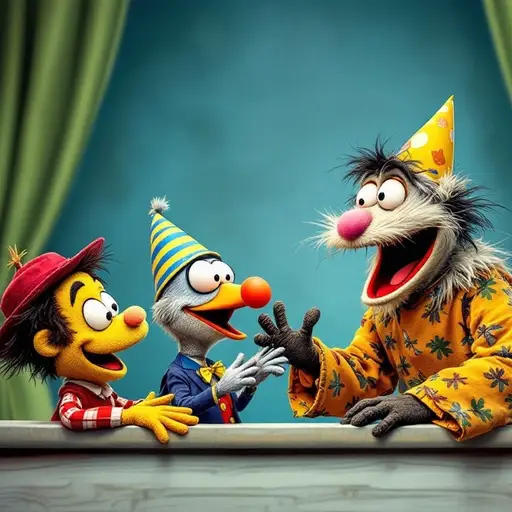
Watch hilarious videos packed with laughter, wit, and cheerful moments.

Step back in time with immersive videos showcasing history’s pivotal moments.

Watch heartfelt videos exploring the dynamics of family and parenting.

Watch exhilarating videos showcasing the excitement and spirit of sports.

Watch motivational videos that inspire personal growth and well-being.

Watch creative videos where favorite characters embark on new adventures.

Watch insightful videos exploring entrepreneurship, innovation, and business strategies.

Watch educational videos that spark curiosity and foster a love for learning.

Watch thought-provoking videos on life’s big questions and diverse beliefs.

Watch breathtaking videos celebrating the beauty and complexity of the natural world.

Watch captivating travel videos showcasing distant lands and thrilling adventures.

Watch captivating videos that explore the rhythms and stories of music.

Explore dynamic videos showcasing cutting-edge tech and groundbreaking innovations.

Watch mesmerizing videos celebrating the art of stage and screen performances.

Watch stunning videos celebrating the beauty of art and photography.

Watch engaging videos that celebrate culture and examine societal norms.

Watch compelling videos that dive into real events, fascinating facts, and profound insights.

Watch mouthwatering videos celebrating the art of cooking and global cuisine.

Watch videos blending real-life stories with imaginative narrative styles.

Watch hands-on videos to spark your creativity and explore DIY hobbies.

Watch inspiring videos about creating beautiful homes and thriving gardens.

Watch high-octane videos about speed, machines, and the thrill of the open road.

Watch a variety of unique videos that defy traditional categories.
An AI video generator is an online AI video maker and AI video editor that turns text, images, or scripts into videos. Story.com is used by more than 1 million users and is built around a story-first workflow: prompt, narration, timed scenes, visual generation, timeline edits, and export.
Type your idea, paste a script, or let the AI generate one from a single prompt. Our text to video generator handles the rest.
The Movie Agent auto-generates video scenes with consistent characters, cinematography, and native audio — powered by Veo 3 and Kling models.
Fine-tune pacing, reorder scenes, and iterate in real time with our drag-and-drop timeline editor. Export in 1080p when you're ready.
Try this prompt“A 60-second explainer video about how solar panels convert sunlight into electricity, with animated diagrams”
Try this prompt“A noir-style short film set in 1940s Chicago where a jazz musician discovers a hidden message inside a vinyl record”
Try this prompt“A fast-paced 30-second Instagram reel showcasing a day in the life of a street food vendor in Tokyo”
Magical worlds and epic visual adventures
Dark atmospheres and cinematic suspense
Heartfelt stories brought to life visually
Futuristic visuals and space-age cinematography
Animated tales perfect for young viewers
Fun, lighthearted AI-generated clips
Edit films with an unlimited AI-powered timeline
TikTok, Reels & YouTube Shorts in 60 seconds
Visualize your script before shooting
Yes. Story.com offers an online AI video generator with free-to-start creation in your browser. More expensive generation and export steps use pay-per-use credits, so you only spend when you create.
Story.com combines a drag-and-drop timeline editor, an autonomous Movie Agent, and access to leading models like Veo 3, Kling, and GPT-Images in one platform. Unlike simpler video generators, you get scene-by-scene control, character consistency, and native audio generation.
Yes. Story.com is built for AI movie making. Write or import a full script, and the Movie Agent will generate scene-by-scene video with consistent characters and cinematography. Edit everything on the timeline — reorder scenes, adjust pacing, and add audio before exporting your movie in 1080p.
Story.com works as a web-based AI video generator — no app download needed. It runs in any modern browser on desktop or mobile. You can generate, edit, and export AI videos from anywhere with an internet connection.
Absolutely. Our text to video generator converts scripts, prompts, or plain text into full video sequences. Paste your script, and the AI generates matching visuals, transitions, and audio for each scene automatically.
Story.com integrates with Veo 3 Fast for high-quality video, Kling for text-to-video conversion, and GPT-Images for scene creation and character consistency. The platform automatically selects the best model for each task.
Story.com's AI maintains character appearance across every scene in your video. Once a character is established, the platform preserves their look, clothing, and features throughout the entire project — no manual adjustments needed.
Move from the video generator hub into focused video creation and editing workflows.